Moving off spreadsheets: picking job software for a small trades business
When a small trades or home service company has outgrown spreadsheets, what job management software should do, questions to ask before you choose, and how to switch without losing your customers or quotes.
By the SmoothFlo team · Updated November 8, 2026 · 8 min read
Most trades businesses start on a spreadsheet, a notebook and a phone full of texts. That's fine for the first few jobs. Then one day you forget to call a lead back, send a quote with last year's prices, or can't work out who still owes you money. That's the sign it's time for something better.
Signs you've outgrown spreadsheets
- Leads slip through. Someone asked for a quote and nobody called back.
- Each quote takes an evening, copied from an old one and edited by hand.
- You don't know which quotes are waiting for an answer, or who to follow up with today.
- Only one person knows where everything is, and they're on a roof.
- Chasing payments means going through bank statements.
- You can't tell which jobs made money and which didn't.
What job software should do for a small crew
You don't need everything. You need the handful of things that win jobs and get you paid, working well on a phone:
- 1Leads in one place. Website forms, calls, referrals and social media all land on one board, with alerts.
- 2Quotes from your own price book. Consistent prices, your wording, photos, options, and the customer accepting on their phone.
- 3Follow-ups that remind you. Who to call today, without having to remember it yourself.
- 4A schedule the crew can see. Estimate visits and work days, on everyone's phone.
- 5Invoices and payments. Deposits, final invoices, and who still owes you.
- 6Your numbers. What you quoted, what you won, and what each job really cost.
Questions to ask before you choose
- Does it work well on a phone? Most of your day isn't at a desk.
- Can I bring my customers, quotes and prices with me? And can I take them out again later?
- How long until I send my first real quote? Hours, or weeks of setup?
- What does it cost with my whole team, not just the starting price? Watch for per-user charges and add-ons.
- Is it built for my kind of work? Quoting a paint job room by room is different from quoting a service call.
- Can I try it on real jobs before paying?
- Who helps me if I get stuck, and how fast?
How to switch without losing anything
- 1Export what you have: customers, open quotes, unpaid invoices, and your price list. A CSV from your spreadsheet or old app is fine.
- 2Set up your prices first, so every new quote comes from them.
- 3Import your customers and open quotes, and check a few to make sure they came through correctly.
- 4Pick a start day. From that day, every new lead and quote goes in the new system only. Running two systems side by side is how leads get lost.
- 5Show the team the three things they'll use every day, not everything at once.
- 6Keep the old spreadsheet read-only for a few months, in case you need to look something up.
Switching to SmoothFlo
SmoothFlo is built for trades and home service companies. It covers leads, quotes, follow-ups, the schedule, invoices and payments, and works on any phone.
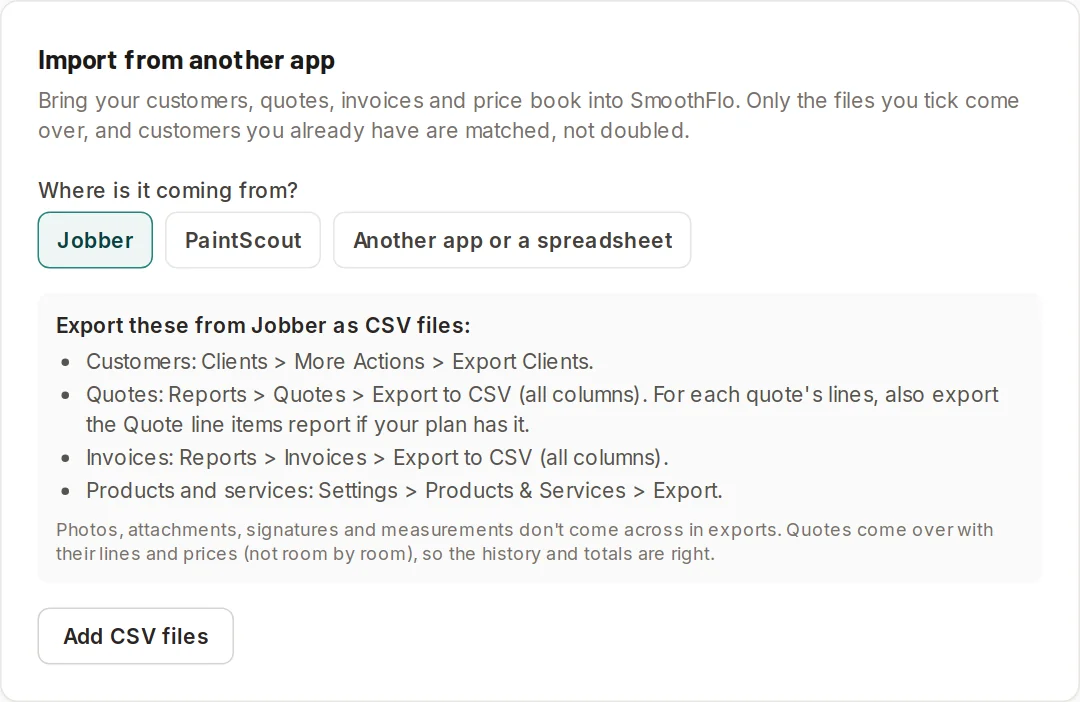
- Settings > Import brings in customers, quotes, invoices and products from Jobber, PaintScout, or any spreadsheet. It guesses which column is which, and shows you a preview before anything is added.
- Your quotes become jobs in your pipeline with their lines, and your invoices come in with payments already recorded.
- Painters get rooms that price themselves from measurements. Other trades get packages that add a whole set of items in one tap.
- Try it free with your real jobs before you pay.
Once you're set up, see speed to lead and how to write an estimate customers say yes to to get the most out of it.
Questions contractors ask
When should a contractor switch from spreadsheets to software?
When leads start slipping through, quotes take too long, or only one person knows where everything is. For most companies that's around the time they hire their first helper or estimator.
Can I import my customers from a spreadsheet?
With most job software, yes. In SmoothFlo, Settings > Import reads CSV files from a spreadsheet, Jobber or PaintScout and shows a preview before anything is added.
How long does it take to switch?
For a small company, usually a day or two: set up your prices, import customers and open quotes, then send every new quote from the new system.
Built for the trades
Do all of this in one place
SmoothFlo handles leads, door knocking, room-by-room estimates, follow-ups, invoices and job profit for contractors. The screenshots in this guide come from it.